
Research search opportunities
Run audits and keyword plans to identify the buyer questions your pages should answer. See workflows
Home/Platform/Self-hosted AI agent for marketing
Tin is a self-hosted AI agent for marketing, built as an open-source system for coding agents. Our team sets Tin up inside your environment, on your repo and your data, and runs the weekly jobs. The code is open, so your team can also run the system itself.

A self-hosted AI agent runs on a machine your team controls. Your team manages the installation and the files its jobs use. For marketing, those files can hold research, drafts and reports, giving the next audit or writing job earlier work to read.
Tin is an MCP server for Claude Code, Codex or Cursor. The coding agent calls a workflow; Tin handles its timers, retries and wait for review. You can run that system with your own keys, data and schedule. With a vendor-hosted service, the installation runs on the provider's infrastructure.
Getting a draft from a prompt is only the start of a recurring job. Someone has to arrange the next run, give it the right context and keep its instructions useful.
Tin supplies schedules, project memory and review for the jobs that need to keep running.
Run the system on your machine and keep the research, drafts and recurring jobs in a project your team can inspect.
Use your own keys when you run the system yourself. Tin connects the coding agent to marketing jobs while the installation stays on the machine your team controls. Manage the recurring jobs there, with their inputs and schedules available to inspect.

Reports, research, drafts and the project wiki live as plain files in a git repository. Open the files to read what a job produced, and use the history to follow changes. The next person working on the project can inspect the same material.
Workflows save their inputs and schedule, so the weekly job has a defined starting point. Tin handles the timers and retries around each run. The week view puts the recurring work in front of the team, from research and writing through review and measurement.
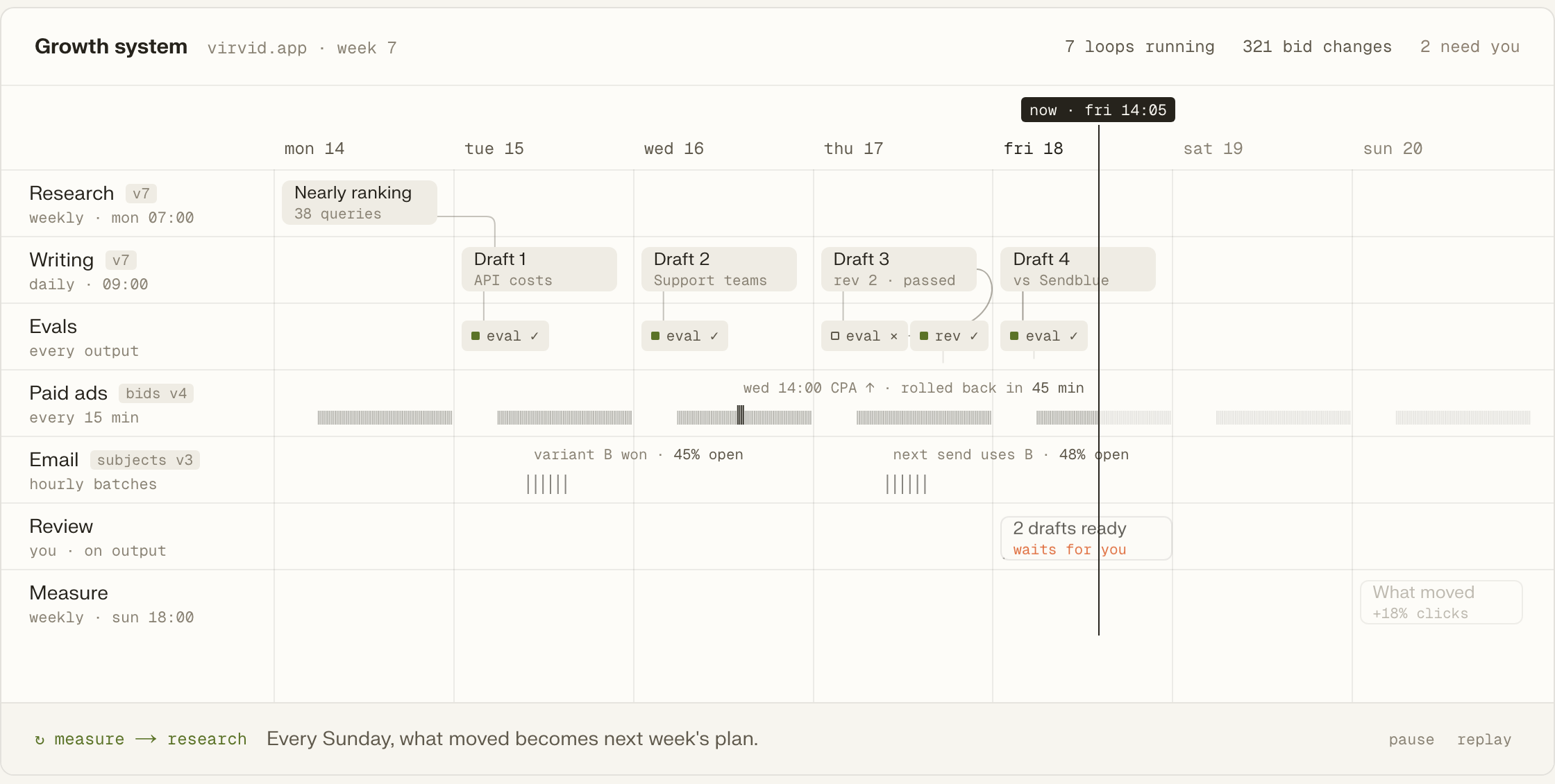
Drafts arrive as a pull request or a one-click publish. Nothing goes out on its own. The decision card holds the next action, including publishing, opening a pull request or leaving the draft for later. A GitHub change is ready for the owner to inspect and merge.
A later run can read the project's earlier work through project memory. Company research and decisions stay alongside the reports and drafts. The coding agent uses that context to fill the next job's inputs and review what it produces.
Run audits and keyword plans to identify the buyer questions your pages should answer. See workflows
Produce drafts in the owner's voice and refresh existing pages from the project context. See workflows
Prepare X and LinkedIn drafts for review from the ideas and material in the project. See workflows
Build a mailbox shortlist and run an email campaign with follow-up that stops on replies. See workflows
Examine whether Google Search ads fit the business, then use campaign check-ups to review the work. See workflows
Bring a weekly brief and PostHog analytics brief into the project for the next decision. See workflows
The hosted connection works with your marketing-site repository. The same projects are available in the browser.
Add Tin to Codex with the command below, or open the same projects in the browser.
codex mcp add tin --url https://app.tin.computer/mcpConnect the outward-facing marketing site first, so your first jobs work with the pages buyers see.
The whole system can also run on your team's own machine from the repository.
Each workflow is a folder containing its steps, data inputs and evaluations.
Edit its files to adapt the job your coding agent runs.
Turn skills into workflows with the system's one-command conversion.
Open source, Apache 2.0.
We set Tin up inside your environment, on your repo and your data, and adapt the workflows to the way your team already works. Our people run the weekly jobs and improve the workflows. The code stays yours after we leave.
People still decide which marketing jobs to run and whether the work is useful. A technical team can operate and change the system themselves. If you want help setting it up and improving the workflows, Tin's service supplies people to do that work with your team.
An MCP server makes tools available to a coding agent. Through Tin's server, Claude Code, Codex or Cursor can call marketing workflows while working with your repository. The command on this page connects Codex to the hosted server; it does not install Tin on your machine.
Self-hosting uses your keys and your choice of coding agent: Claude Code, Codex or Cursor. Your team manages both the agent and the Tin installation. The marketing jobs use the project files and schedules you keep in that installation.
You can run the Apache 2.0 code without paying Tin for it. Your team supplies the keys and machine and spends time running the system. Tin's team can do that work for you, from setup to the weekly marketing jobs.
Talk with the founders and engineers who set Tin up and run the work. We can discuss which weekly marketing jobs to start with and how we would run them in your environment.