
Find organic opportunities
Run technical SEO and AI visibility audits, then prepare a keyword plan. Browse organic workflows
Home/Platform/Open-Source AI Agents That Run Your Marketing
For teams exploring open-source AI agents, Tin supplies scheduled marketing workflows with memory and keeps each run's work as files in git. Our team sets up the system on your repository and data, adapts the jobs to your company and runs the weekly work.

An AI agent uses a model to carry out a task in steps, calling tools as it works. Open source means the code is published under a licence that lets a team read, run and change it. When you choose an open source AI assistant, look at the jobs it is built to handle. For recurring marketing, those jobs need access to the company's data and a record of earlier work.
OpenHands serves software development; Flowise and Dify offer visual builders for agent apps. n8n combines automation with agent steps and supports self-hosting; Open WebUI provides a self-hosted chat interface. Tin supplies an open-source marketing system for coding agents, with the marketing jobs already written. For marketing, ask what it can do on the first run and whether the jobs that repeat keep a schedule and memory.
Choosing a general agent framework leaves a marketing job to write: the instructions it follows, the accounts it reads and the checks on its output.
Tin supplies written marketing workflows with these parts, used on our own products.
Save a recurring job with its inputs. Tin handles when it runs and keeps the files it produces for later jobs to read.
A saved workflow includes the inputs and schedule for its job. Tin handles timers and retries around the run, so the job can repeat from that setup. Open the Week view to see how research, writing and measurement fit into the company's marketing week.
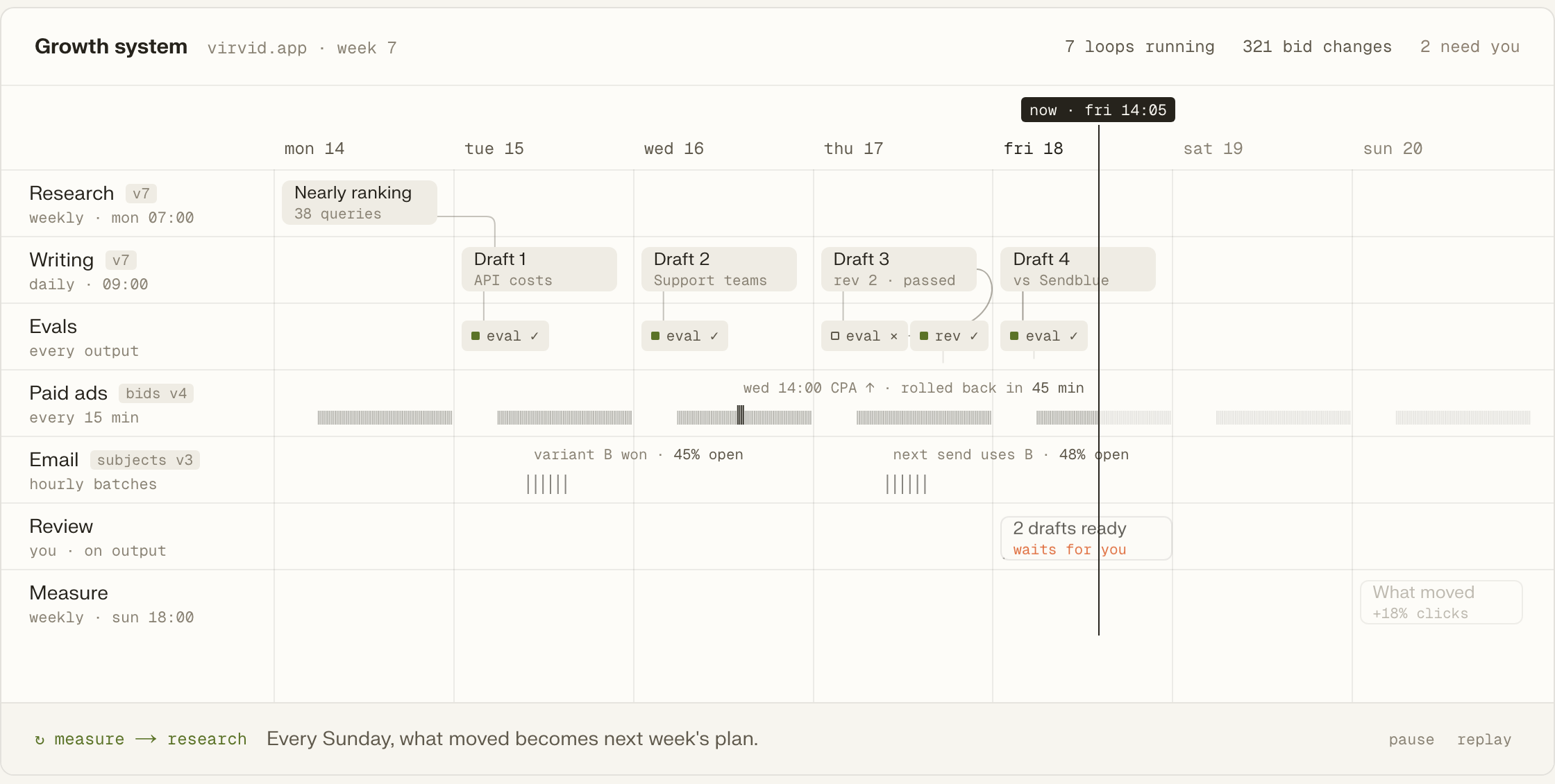
Research, reports and the project wiki stay in git as plain files. Project memory makes that context available to later runs. A job can read what came before, and the people working on the project can inspect those same files and their history.

Every Sunday, what moved becomes next week's plan. The weekly brief brings the response to the previous work into the project. The next planning run reads that brief when deciding which research, drafts and campaigns should follow.
A draft waits for the owner as a pull request or a one-click publish. The Decision card puts that choice beside the work produced. Read the draft against the project's research and earlier work. The available actions include publishing, opening a pull request or leaving it for later.
Tin is an MCP server available to Claude Code, Codex and Cursor. The coding agent reads the repository and fills the marketing job's inputs from that context. With the product code open, ask the agent to use Tin for the next audit, research task or draft.
Run technical SEO and AI visibility audits, then prepare a keyword plan. Browse organic workflows
Draft articles in the owner's voice and refresh pages already in the project. Browse content workflows
Build a weekly social plan with X and LinkedIn post drafts. Browse social workflows
Prepare mailbox shortlists, paced email campaigns and replies to relevant community threads. Browse outreach workflows
Work on marketplace listings, awesome lists and newsletter placements for the company. Browse listing workflows
Read weekly briefs, PostHog analytics briefs and competitor watch before choosing the next tasks. Browse measurement workflows
Use the coding agent already open on your project, share that project in the browser, or have our people run its marketing jobs.
Add the hosted Tin server to Codex, then ask the agent to run a marketing job for your product.
codex mcp add tin --url https://app.tin.computer/mcpOpen the same projects at app.tin.computer, with the research and drafts in git available for the team to read.
Our people connect the company's repo and data, adapt the workflows and take on the recurring marketing jobs.
Every workflow is text in the repo.
Your keys, your data, your schedule.
Edit the file and send it back.
Open source, Apache 2.0.
Let's discuss the recurring marketing work your engineers would like us to handle. We can set up Tin, adapt the jobs to your company and keep improving them. Your company keeps the code.
You can ask a coding agent to run Tin's jobs and open the same projects in the browser at app.tin.computer. The agent uses your repository to fill the job's inputs. Our people can also take on the setup and run the recurring marketing work for the company.
Yes. Bring your own skills. One command turns them into workflows. Add the existing marketing jobs your team has already developed for its buyers, keeping their instructions in the repository. They sit alongside jobs for research, drafts, outreach and measurement.
Tin handles retries around scheduled runs. The workflow keeps its saved inputs and schedule, while files already produced remain in the project repository. The team can read those files while investigating the failure, using the saved work to understand what happened and what to change.
Tin adds the recurring job's data, schedule and project memory to the coding agent. It connects the mailbox and repository, keeps reports and drafts as files, and supplies the review steps around production. When the next draft or brief is due, its run reads the work already saved in the project.
Talk to the founders and engineers who would set up and run the system for your company. We can discuss the jobs that repeat in your marketing week and which ones to schedule first.