
Check search visibility
Audit public pages and examine whether AI answers mention or recommend the business. Browse search audits
Home/Platform/Marketing Skills for Claude That Run Every Week
Tin turns marketing skills for Claude into jobs with a schedule, project memory and review. We set up those jobs in your repository and run the weekly marketing. Claude uses what it knows about the product as it works through the research, writing and outreach.

A marketing skill gives Claude reusable instructions, scripts and checks for a particular job. The job might be an audit, keyword research, a draft, an outreach list or a report. Teams can run a skill by hand in a session, collect skills from a marketplace, or turn them into scheduled workflows through Tin. Compare those choices by what keeps the job running next week.
A skill provides the instructions Claude reads when asked to do the work. A library gives the team instructions for more kinds of jobs. In Tin, the skill becomes a workflow with saved inputs, a schedule and project memory. Later runs can read earlier research and decisions, and the job has a defined place in the company's recurring marketing work.
If a skill runs only when someone opens Claude and asks, the weekly draft waits until someone has time to start it.
A schedule starts the job again, and shared memory supplies the research from earlier runs.
Tin keeps the job's inputs, timetable, memory and checks in the project. We can read those parts when adapting a skill for weekly work.
An existing skill can be turned into a Tin workflow with one command. Its instructions become the basis for a job in the project. We adapt the job to your environment and the marketing work it needs to do, using the skill your team has already developed.
A workflow saves both its inputs and its schedule. Tin takes care of the timers and retries that run the job again. In the Week view, the team can see the recurring work together, including when the research and writing jobs are set to run for the project.
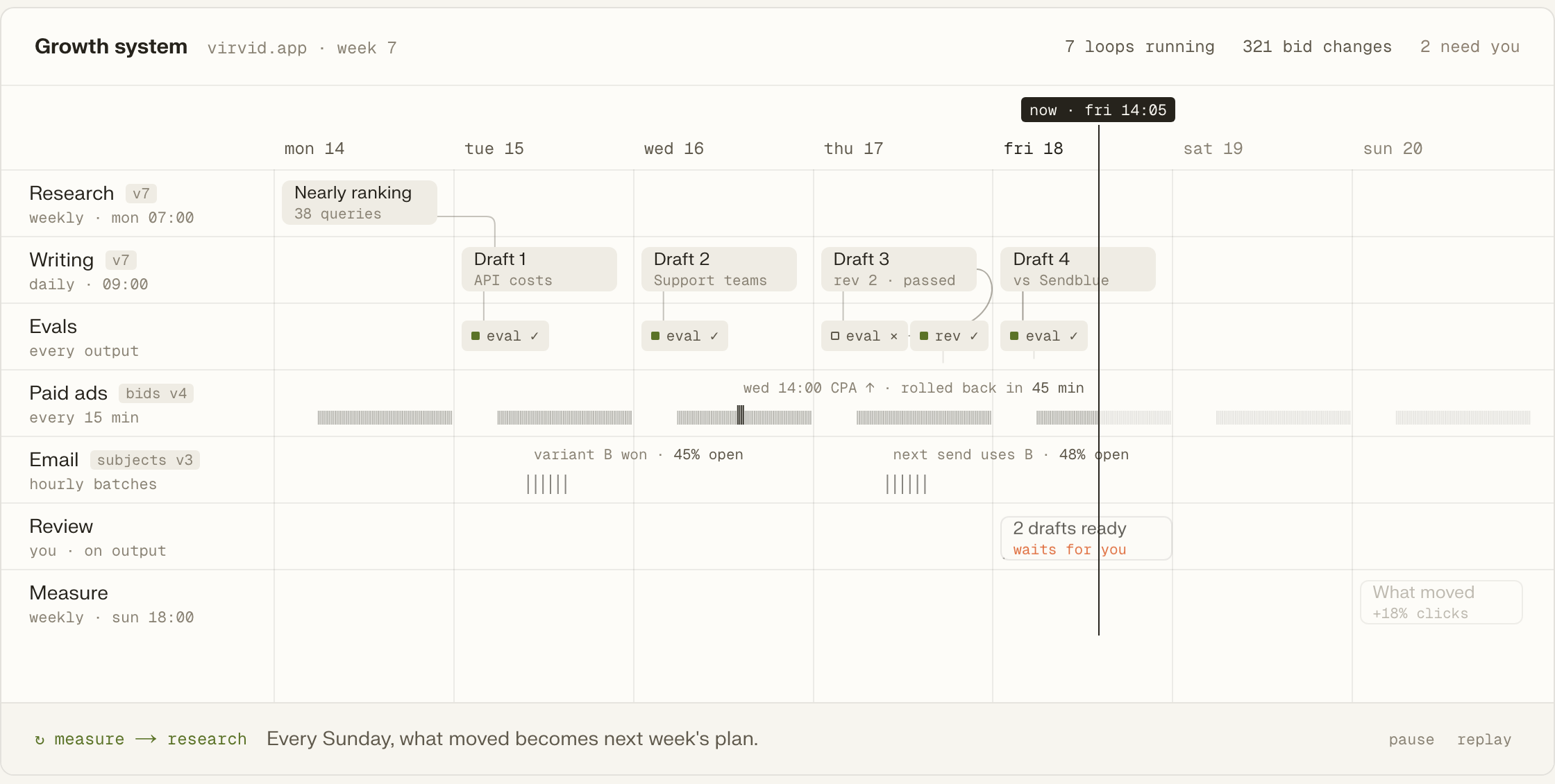
Research and decisions are kept in project files through the memory workflow. Later runs read them when preparing the next report or draft. A finding from last week's research can therefore be used again. We keep that record with the project as the marketing work develops.

When the writing job finishes, the draft waits for a decision. The owner approves the important steps, and our people review the work before buyers see it. A decision card places the proposed next action beside the draft, where the person reviewing it can consider what should happen.
Each workflow folder includes evaluations that score its output. The team can read those checks alongside the job's steps and data inputs. That makes the criteria available when we assess a draft or report and refine the instructions for the work the next run will produce.
Audit public pages and examine whether AI answers mention or recommend the business. Browse search audits
Gather buyer searches and competitor keywords into an inventory with supporting evidence. Browse keyword research
Draft the next planned article using the company's captured writing style. Browse article drafting
Produce X and LinkedIn drafts from a social plan or an existing article. Browse social drafting
Build an outreach shortlist from the company's mailbox for the next campaign. Browse mailbox workflows
Run an email campaign with paced sending from the project used for outreach. Browse outreach campaigns
The command connects Claude Code to Tin's hosted server. The repository supplies product context for the marketing jobs we set up there.
Add the hosted MCP server with the command below, then let Claude work with Tin from the product repository.
claude mcp add --transport http tin https://app.tin.computer/mcpClaude uses the repo to fill in hosting, analytics and mailbox details before Tin ranks the marketing systems.
Our team handles setup and the weekly runs, adjusting the instructions as we learn from the marketing work.
Open the workflow text in the repository to inspect how a marketing job is defined.
Tin can also run on a machine your team supplies, with its keys and data.
Changes to the instructions change the job the system runs for your company.
Open source, Apache 2.0.
We can talk through the weekly jobs your marketing needs and which skills could do them. Our people set up and run the work; your team keeps the code.
Yes, the skills stay in your repository as files. Turning one into a Tin workflow adds the recurring job around it. The instructions remain available to your team and its coding agents, so they can be read and changed outside the scheduled work as well.
The skill is the instruction file Claude loads to learn how to do a job. An MCP server makes tools available for Claude to call. Tin uses MCP to make its marketing workflows available, while skills supply instructions for the work. Both can be used in the same session. Read about skills and MCP.
The social workflows prepare X and LinkedIn drafts. They save the proposed posts with their source material for a person to read; they do not publish or schedule those posts. A draft can come from the weekly social plan and current notes, or from an article the company has written.
Yes, the same Tin projects are available in the browser. The terminal command is a way to connect Claude Code, while the browser gives access to the project without a coding session. Our team can run the marketing jobs for you whichever way you follow the work.
Meet the founders and engineers who turn skills into recurring marketing work. We can talk about the jobs your company repeats, which of your existing skills could help and where our team would take on the work.